Edifier Qr65 Honest Review — Is the Hype Justified?
I have spent the last four months with a pair of speakers sitting on my desk that look unlike almost anything else in the consumer audio space right now. If you have spent any time on desk-setup subreddits or aesthetic tech Instagram reels lately, you have undoubtedly seen the Edifier Qr65. With its translucent faceplates and deep, pulsating RGB "Infinity Mirror" effects, it is a product designed to catch the eye before it ever catches the ear. But as someone who has been burned by "aesthetic" tech in the past—where the budget clearly went to the lighting and the actual performance was an afterthought—I was skeptical. I finally decided to put my own money down to see if these were legitimate desktop monitors or just expensive lamps that happen to play music.
The Edifier Qr65 is marketed as an all-in-one desktop active monitor system featuring High-Res Audio, GaN charging capabilities, and a distinct visual identity. After using them daily for work, gaming, and critical listening, I’ve found that the experience is a complicated mix of genuine innovation and frustrating quirks. In this review, I’m going to break down why I think these speakers are a polarizing masterpiece that might be perfect for some, but a complete dealbreaker for others.
First Impressions and the "Unboxing" Reality
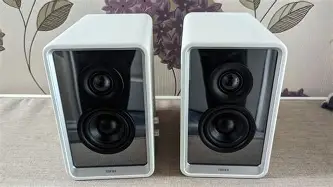
When I first pulled the Qr65s out of the box, the weight was the first thing that struck me. One speaker is significantly heavier than the other because it houses the internal amplifier, the Gallium Nitride (GaN) power delivery system for the USB ports, and the lighting controller. The build quality feels dense and premium. I opted for the white version, which has a faux-leather texture wrapping around the chassis. In my experience, this material is a bit of a double-edged sword; it looks sophisticated and feels great to the touch, but it is a magnet for dust and, if you aren't careful, scuffs from cables dragging across the top.
Setting them up was relatively straightforward, though I noticed immediately that the proprietary connector cable between the left and right speakers is quite thick. It isn't a standard speaker wire; it’s a DIN-style cable that handles both the audio signal and the power for the RGB lighting in the passive unit. This means if that cable ever breaks, you aren't just running to the local hardware store for a replacement. You’ll be dealing with Edifier’s customer support. Once I got them positioned on the included aluminum stands—which, I should note, are angled perfectly for a seated desk position—the visual impact was undeniable. When the infinity mirrors light up, it creates an illusion of depth that genuinely looks like a portal into the speaker cabinet.
The Sound Quality: Beyond the Lights
Let’s talk about what actually matters: the sound. The Qr65 utilizes a 2.75-inch mid-low driver with an aluminum alloy diaphragm and a 1.25-inch silk dome tweeter. On paper, it supports LDAC for high-res Bluetooth and is Hi-Res Audio and Hi-Res Audio Wireless certified. In practice, the sound signature is classic Edifier—warm, punchy, and surprisingly detailed in the upper frequencies, but it has some physical limitations due to its size.
In my first few weeks of listening, I found the bass to be the most surprising element. For a 2.75-inch driver, the low-end extension is impressive. Edifier uses what they call MazeTube technology, which is essentially a sophisticated bass reflex porting system. When I was listening to bass-heavy tracks like "Angel" by Massive Attack, I could actually feel the vibrations on my desk. However, there is a point of diminishing returns. Because the woofers are small, they are working extremely hard to produce that low end. At volumes above 70%, I noticed the DSP (Digital Signal Processing) starts to kick in heavily to prevent distortion, which can make the music feel a bit compressed or "choked."
The mids are where I felt the most conflict. For vocal-centric tracks or podcasts, the clarity is excellent. I felt like the separation between the vocals and the instrumentation was well-defined. However, there is a slight "recessed" feeling in the lower-mids. When I was watching action movies, some of the impact of explosions or deep male voices felt a little thin compared to my larger 5-inch studio monitors. This is the trade-off for having a compact desktop footprint. You get incredible crispness from the silk dome tweeters—which, I must say, are never harsh or sibilant—but you lose that "chest-thumping" mid-range presence.
The GaN Charging: A Gimmick or a Godsend?
One of the most unique features of the Qr65 is the integrated 65W GaN charging station on the side of the primary speaker. I’ll be honest: I thought this was a gimmick when I bought them. I already have a power strip under my desk. Why do I need my speakers to charge my phone?
Find top-rated Electronics products at great prices.
Browse Now →After four months, I can officially say I was wrong. Having two USB-C ports and one USB-A port directly on the side of the speaker has fundamentally changed my desk workflow. I use the primary 65W USB-C port to keep my MacBook Air topped off, and the other for my phone or wireless mouse. What I found was that it significantly reduced cable clutter. Instead of running a long charging cable from the floor up to my desk, everything stays within a 2-foot radius. It’s important to note that if you use all three ports at once, the power is redistributed (e.g., 45W and 15W), which is standard for GaN chargers. It works flawlessly, and I haven't noticed any electrical hum or interference in the audio while charging, which was a major concern of mine initially.
Software and Customization: The Weak Link
While the hardware is stellar, the software experience left me a bit disappointed. To truly customize the "Infinity Mirror" RGB effects or to tweak the EQ, you have to use the Edifier ConneX app. In my experience, the app is functional but feels unpolished. Connecting via Bluetooth to the app sometimes takes two or three tries, and I’ve had the app crash on me several times while trying to create a custom lighting profile.
The lighting presets are cool—there are modes like "Inner Tide," "Breathing," and "Flicker"—but I found myself wanting more granular control over the speed and transitions. Furthermore, the speakers don't have an onboard memory for complex custom lighting if they lose power; they often reset to the default "rainbow" cycle, which can be annoying if you have a specific color theme for your office. I eventually found a setting I liked and just stopped touching the app altogether, which is a shame because there is so much potential for a truly integrated software experience.
Is the Hype Justified? Pros and Cons
After a season of heavy use, I’ve distilled my experience into the following pros and cons to help you decide if these fit your specific needs.
What I Loved (Pros)
- The visual design is truly unique. No other speaker on the market offers this level of aesthetic integration with the infinity mirror effect.
- GaN charging is a game-changer for desktop organization. Being able to charge a laptop at 65W directly from a speaker is a brilliant engineering choice.
- The aluminum stands are included in the box. Many competitors charge extra for isolation stands, but Edifier includes heavy, high-quality stands that tilt the speakers to the ideal listening angle.
- High-Res codec support. Having LDAC support for Android users or high-quality Bluetooth streaming is a nice touch for a desktop system.
- Subwoofer output. If the 2.75-inch drivers aren't enough for you, there is a dedicated sub-out on the back, allowing you to turn this into a 2.1 system easily.
What Disappointed Me (Cons)
- Proprietary interconnect cable. The thick, multi-pin cable between the speakers is difficult to hide and impossible to replace with a standard wire if damaged.
- Physical volume and control knobs feel a bit "plastic-y" compared to the high-end leather-wrap feel of the cabinets.
- Small driver limitations. While the bass is impressive for the size, these cannot replace a full-sized 5-inch or 8-inch monitor if you are doing professional audio engineering or want room-filling sound for a party.
- The app experience is inconsistent. It feels like a mobile app ported over without much thought for the desktop user experience.
- The "Leather" texture is a dust magnet. If you have pets, you will be cleaning hair off these speakers constantly.
Technical Specification Comparison
To give you a better idea of where the Qr65 sits in the market, I’ve compared it to two other popular Edifier models I’ve used in the past: the budget-friendly R1280DB and the higher-end S880DB monitors.
| Feature | Edifier Qr65 | Edifier R1280DB | Edifier S880DB |
|---|---|---|---|
| Total Power (RMS) | 70W | 42W | 88W |
| Driver Size | 2.75" Mid-Low + 1.25" Tweeter | 4" Mid-Low + 13mm Tweeter | 3.75" Mid-Low + 19mm Tweeter |
| Charging | 65W GaN (USB-C/A) | None | None |
| Lighting | Infinity Mirror RGB | None | None |
| Input Ports | USB, Line-In, Bluetooth | RCA, Optical, Coaxial, BT | USB, RCA, Optical, Coax, BT |
| Subwoofer Out | Yes | No (Depends on sub-version) | No |
Buying Guide: Who is this for?
Before you hit the buy button, you need to be honest about what you value in a desktop setup. In my time with these speakers, I’ve realized they serve a very specific niche.
You should consider the Qr65 if you are a "lifestyle" user who spends a significant amount of time at your desk and cares deeply about the visual cohesion of your workspace. If you have a clean, modern aesthetic and you want to eliminate the clutter of phone chargers and bulky traditional speakers, these are arguably the best option on the market. They are also excellent for gamers who already have an RGB ecosystem (Razer, Corsair, etc.) and want speakers that can match that vibe without looking like cheap plastic "gaming" gear.
However, if you are a purist audiophile who only cares about the widest possible soundstage and the most accurate frequency response, you might be better off spending the same amount of money on a pair of dedicated studio monitors like the JBL 305P or the Yamaha HS5. Those speakers are much larger and lack all the "smart" features (charging, RGB, Bluetooth) of the Qr65, but they will provide a more neutral and powerful sound. You have to ask yourself: am I paying for the sound, or am I paying for the integration? With the Qr65, you are paying about 50% for the audio and 50% for the design and charging utility.
Shop the latest Electronics picks on Amazon.
See Deals →One specific detail I noticed that might help you decide: the depth of the speakers. They are surprisingly deep (front to back). If you have a very shallow desk, these might sit uncomfortably close to your monitor or your hands. I have a 30-inch deep desk, and they fit perfectly, but on a 24-inch desk, they might feel a bit imposing.
Common Observations from Several Months of Use
I noticed a few things that weren't in the initial review videos I watched before buying. First, the auto-sleep function is very aggressive. If you aren't playing audio for about 20-30 minutes, they go into a standby mode. While this is great for power saving, there is a slight 2-second delay when you start a video or song for the speakers to "wake up," meaning you often miss the first few words of a YouTube video. It’s a minor annoyance, but one that I deal with multiple times a day.
Second, the Bluetooth range is exceptional. I can walk into the next room with my phone, and the music doesn't skip beat. However, if you have multiple devices paired, the speakers can sometimes get confused about which one should have priority. I eventually decided to keep my PC connected via the USB-A to USB-B cable for the best audio quality and only use Bluetooth when I specifically want to stream from my phone.
Finally, I want to touch on the "Infinity Mirror" brightness. During the day, it looks fantastic. At night, in a dark room, it can be a bit much. Even at the lowest brightness setting in the app, the lights are quite vibrant. If your computer is in your bedroom, you will absolutely want to use the physical button on the side to turn the lights off entirely before you go to sleep, as the "standby" light can still be fairly bright.
Conclusion
So, is the hype justified? In my experience, yes—but with a massive asterisk. The Edifier Qr65 is not the best-sounding speaker in its price bracket. You can find better raw audio performance elsewhere if you are willing to accept a boring black box and a mess of charging cables on your desk. But that isn't why people are looking at the Qr65.
What I found after months of use is that the Qr65 is a triumph of "desk-tech" integration. It solves three problems at once: it provides very good (though not professional-grade) audio, it cleans up your charging situation with 65W of power, and it provides a stunning visual centerpiece that makes your workspace feel more personal and futuristic. It is a high-quality piece of hardware that feels like it was designed by people who actually use computers all day. If you value the "all-in-one" experience and love the aesthetic, I don't think you will be disappointed. Just be prepared for a slightly clunky app and the realization that you are paying a "style tax" for those beautiful mirrors. For me, the convenience of the GaN charger alone was enough to make these a permanent fixture on my desk. I came for the lights, but I stayed for the utility.